
V8s PLUE sound card audio automatic adjustment recording for radio broadcasting singing and recording KTV Karaoke microphone
- Category: >>>
- Supplier: Shenzhen Hayner-Seek Technology Co. Ltd.
Share on (1600431920102):
Product Overview
Description
Product Description


Features:
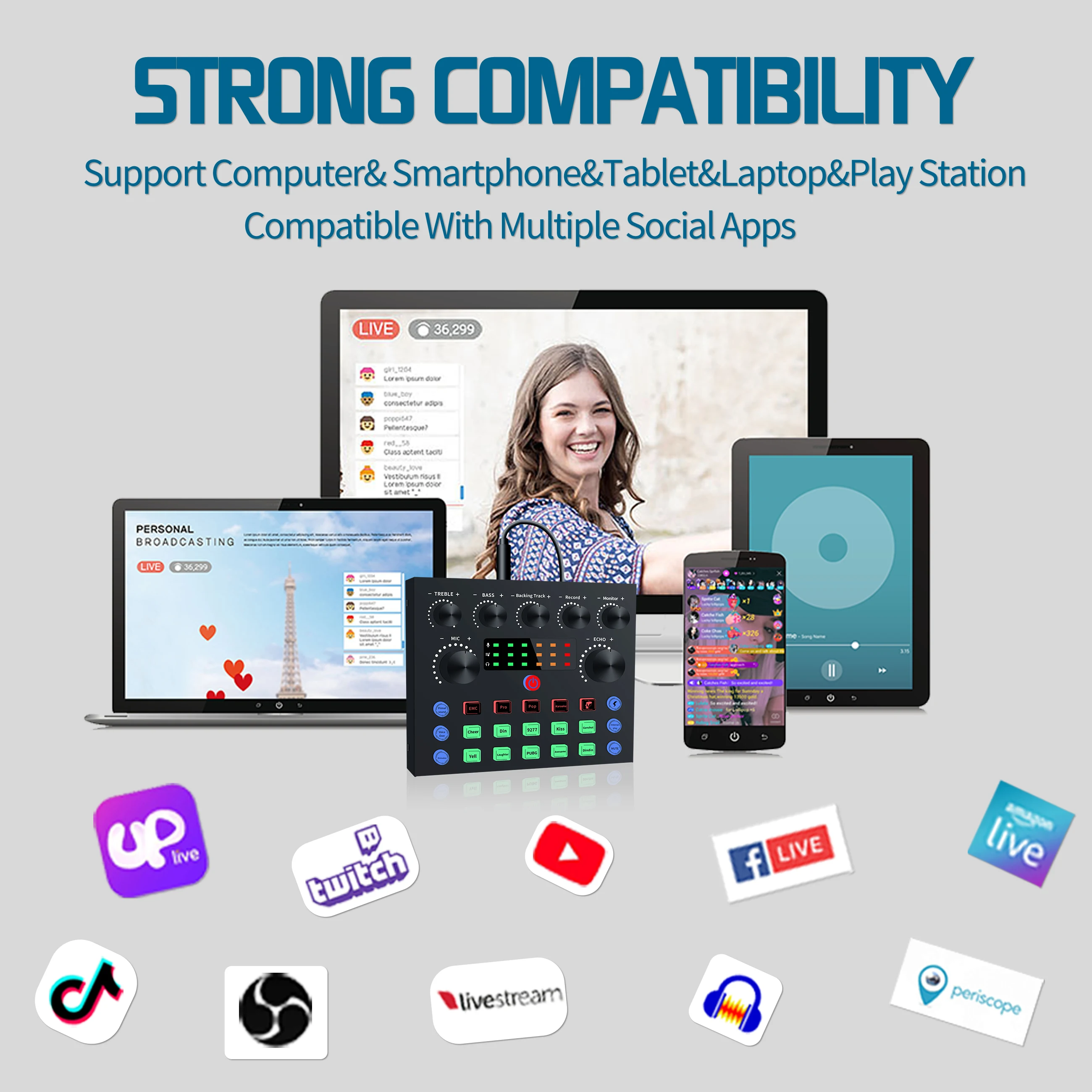
【WIDELY COMPATIBILITY】Squarock broadcast audio interface bundle is compatibly with Window, Mac OS, iOS, Android, Linux... major operate system in the market. Can be used for smartphone, computer, laptop, tablet, Xbox, PS4 and netbook. Also it can be used on OBS studio. Just take it into cart, as long as your device can connect to a external microphone, don`t worry about the bundle can not be used on your device. Our support team is available 24 hours a day online.
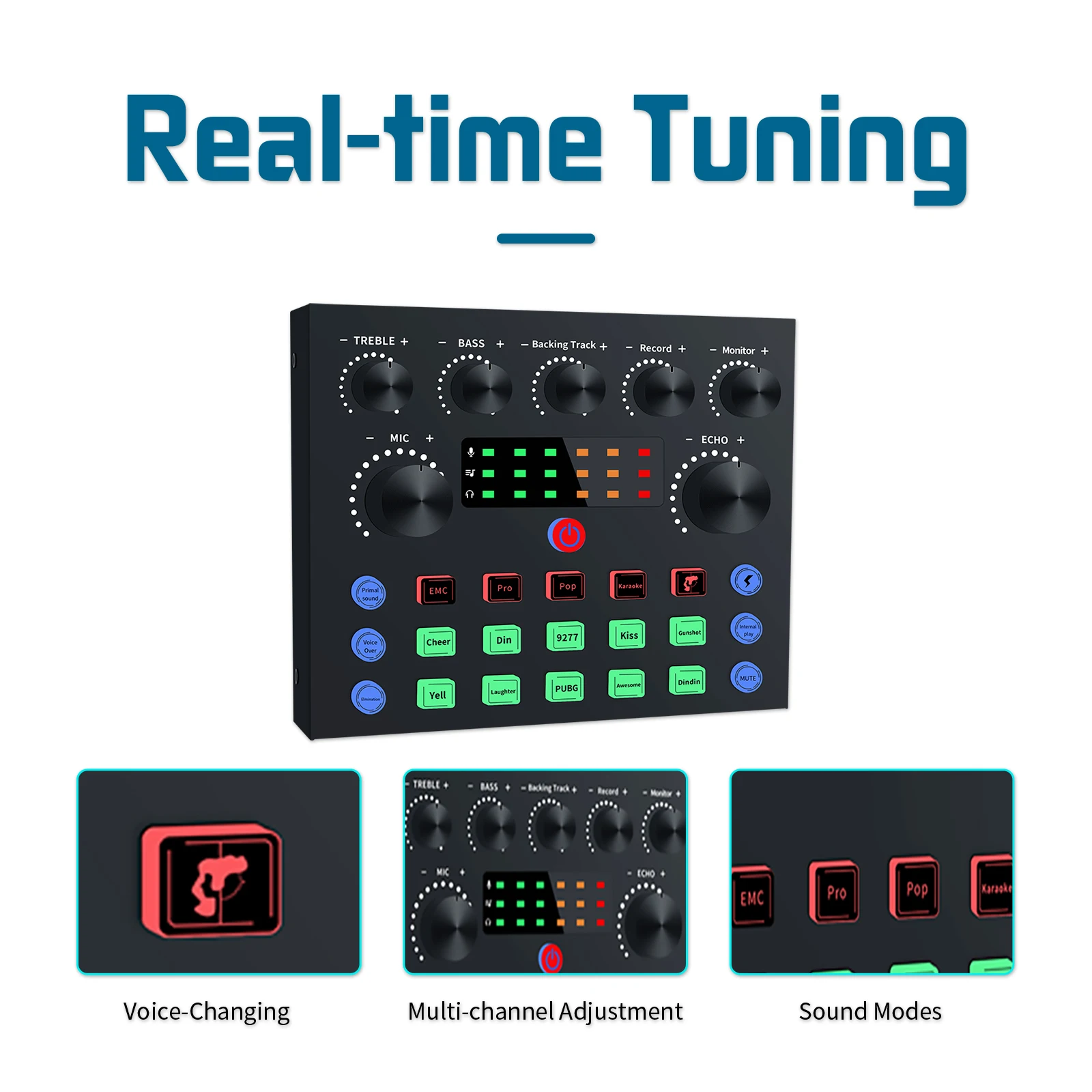
【UPGRADE V8S SOUND CONSOLE】Compare with tradition V8 sound sound mixer, V8S add sound dynamic display, working status indicator button lights, also we upgraded the chip. V8S has more excellent sound quality, better noise canceling function and more humanized use experience.
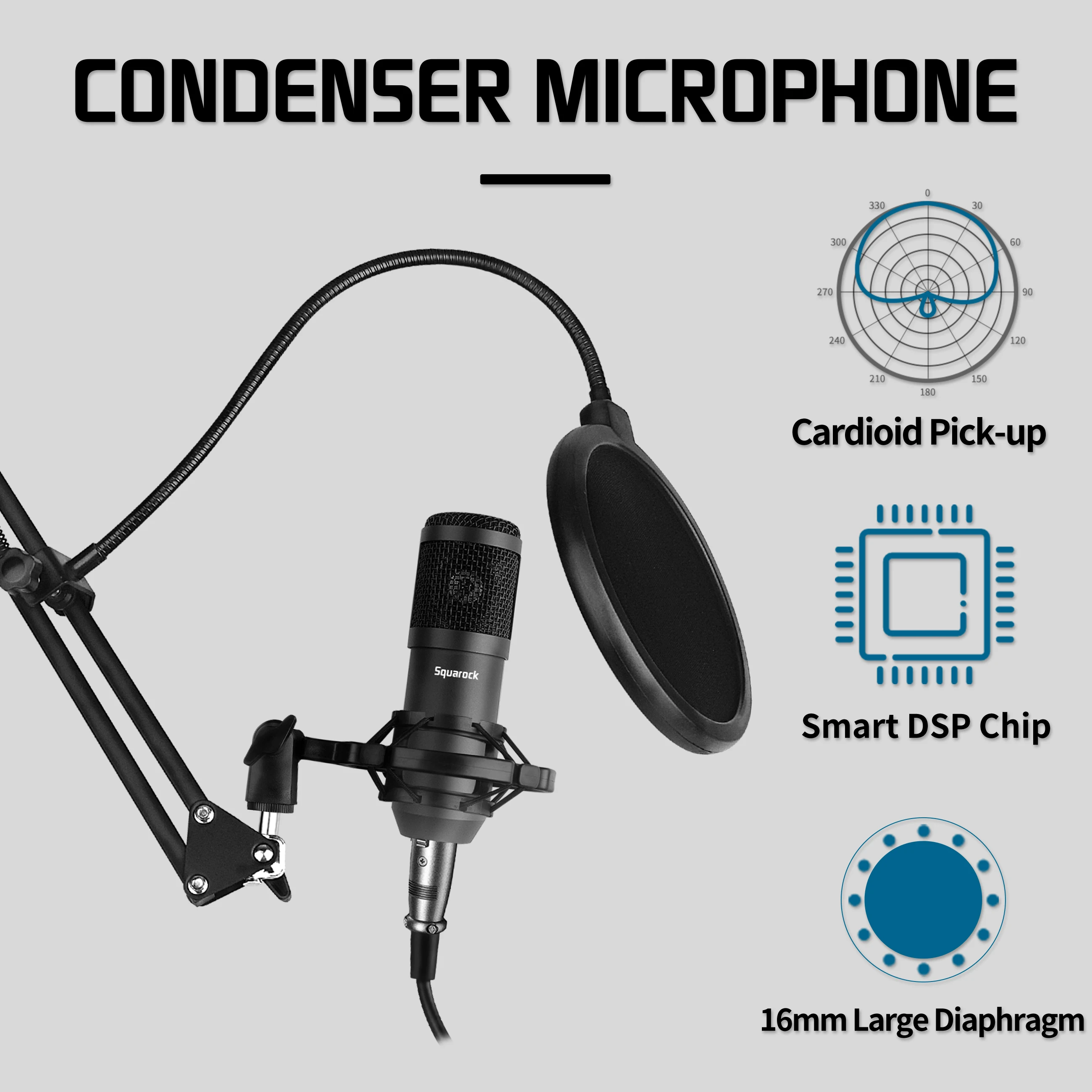
【EXCELLENT SOUND QUALITY】With rugged construction for durable performance, the vocal microphone offers a wide frequency response and handles high SPLs with ease.Ideal for project/home-studio applications. The super cardioid condenser capsule offers crystal-clear audio for communicating, creating and recording.
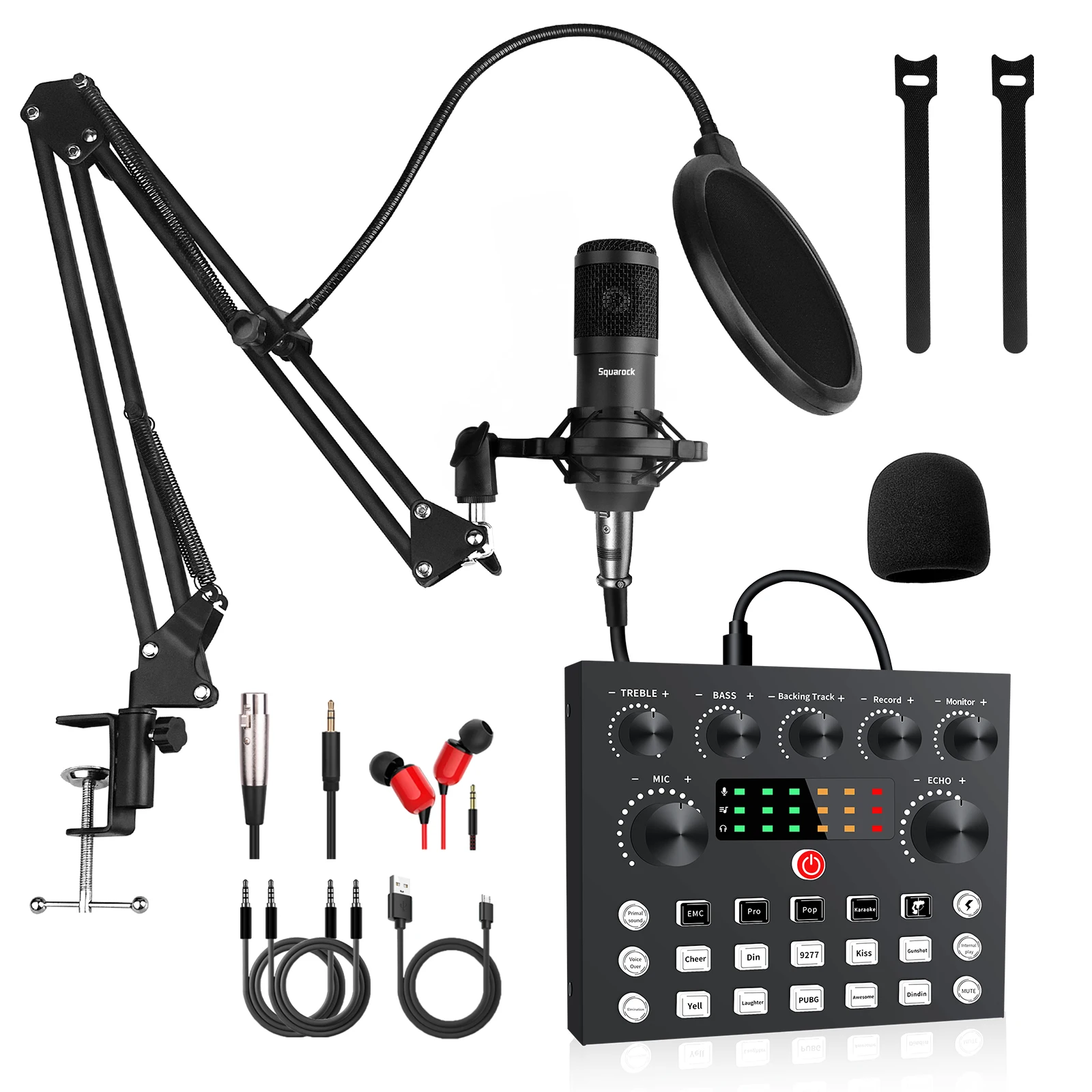
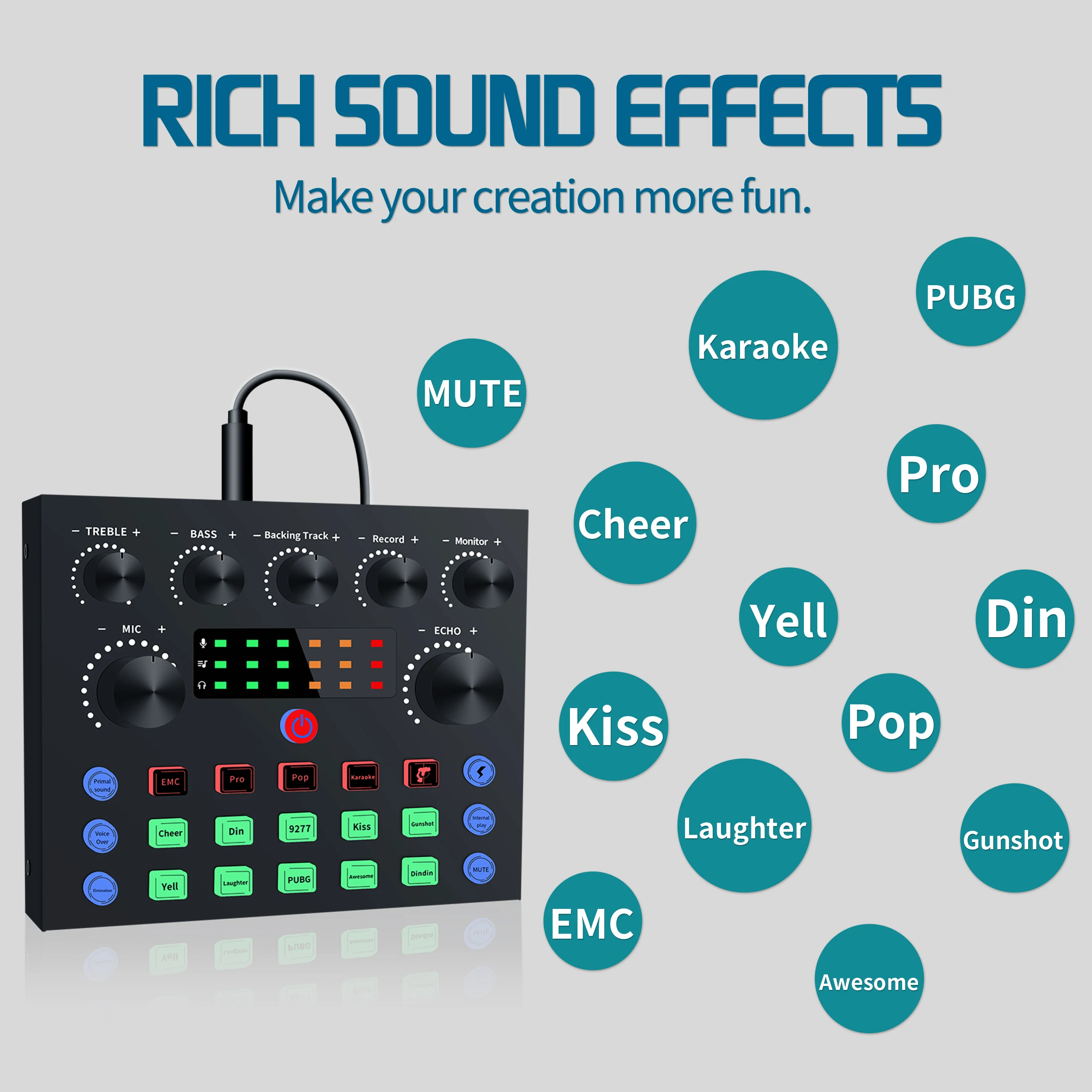
【PROFESSIONAL RECORDING STUDIO EQUIPMENT】This is a simple but pro. audio interface device bundle, help you process the sound of your live streaming or recording. Advantage is simple function, low failure rate. V8S sound console has echo, back track, treble&bass voice over, elimination... 13 functions. Cheer, gunshot, kiss, yell, laught, awesome... 10 sound effects. EMC, pro, pop, karaok 4 voice modes and male, female, child, god 4 voice-change modes.
【WITH MOST POPULAR BM-800 MIC】V8S sound mixer complete with popular BM-800 podcast microphone. All metal shell and black matte over coating, it doesn't be leave nasty fingerprints on the surface. Keep your microphone and sound mixer grace during the video live.
【UPGRADE V8S SOUND CONSOLE】Compare with tradition V8 sound sound mixer, V8S add sound dynamic display, working status indicator button lights, also we upgraded the chip. V8S has more excellent sound quality, better noise canceling function and more humanized use experience.
【EXCELLENT SOUND QUALITY】With rugged construction for durable performance, the vocal microphone offers a wide frequency response and handles high SPLs with ease.Ideal for project/home-studio applications. The super cardioid condenser capsule offers crystal-clear audio for communicating, creating and recording.
【PROFESSIONAL RECORDING STUDIO EQUIPMENT】This is a simple but pro. audio interface device bundle, help you process the sound of your live streaming or recording. Advantage is simple function, low failure rate. V8S sound console has echo, back track, treble&bass voice over, elimination... 13 functions. Cheer, gunshot, kiss, yell, laught, awesome... 10 sound effects. EMC, pro, pop, karaok 4 voice modes and male, female, child, god 4 voice-change modes.
【WITH MOST POPULAR BM-800 MIC】V8S sound mixer complete with popular BM-800 podcast microphone. All metal shell and black matte over coating, it doesn't be leave nasty fingerprints on the surface. Keep your microphone and sound mixer grace during the video live.
Specification
Package Contents | ||
Item | Number | |
Sound card | 1 | |
Condenser microphone | 1 | |
Earphone (wired earbuds) | 1 | |
Microphone tripod set | 1 | |
XLR cable | 1 | |
TSSR cable | 2 | |
USB cable (Micro-USB) | 1 | |
Mic head cover foam | 1 | |
User manual | 1 | |
Sound Card Technical Parameters | ||||||
Model number | V8S | Track system | Dual track | |||
Output sampling rate | 44.1KHz | Battery capacity | 1000mAh | |||
Sampling digit | 16bit | Charge | DC 5V, 1A | |||
Output jack | 3.5mm audio, USB | Power rating | 100mA | |||
Input jack | 3.5mm audio, USB, BT, 6.5mm audio, Mini XLR | Net weight | 270g | |||
Size | 130*105*40mm | Usage scenario | Live streaming, recording, broadcast, gaming... | |||
Feature function | Adjust Treble&Bass, Adjust echo length, intelligent denoise, Pop variety scene sound effects, built-in voice changer | |||||
Microphone Technical Parameters | ||
Model Number: | BM800 | |
Single Unit: | Condenser microphone | |
Directivity: | Unidirectional | |
Sensitivity: | -42±3dB(1.5V,680KΩ;0dB=1V/Pa,1khZ) | |
Output Impedance: | Low impedance(<680Ω) | |
Frequency Response: | 100Hz-20KHz | |
Operation Voltage Range: | 1.0V-10V | |
Max. Operation Voltage: | 10V | |
Current Consumption: | <0.5mA | |
S/N Ratio: | More than 70dB | |
Attention:
1. Can be used with phantom power supply.
2. When used, first tune the volume of the recording equipment to the minimum, then connect the sound card with the
microphone,which can be inserted into the computer to be used. Tune the volume from low to high slowly to its proper level in order to avoid possible squeals from the speaker or earphone being stricken.
3. When you use your hand to cover the microphone head or move the microphone close to the speaker or earphone, it will result in squealing. When this occurs, first tune down the equipment`s volume and pull away the distance between the microphone and the speaker or the earphone.
4. The cartridge and the circuit components inside the microphone are comparably precise. Pay attention not to dropping the microphone from height or giving it a strong strike to avoid damaging the cartridge and the components.
2. When used, first tune the volume of the recording equipment to the minimum, then connect the sound card with the
microphone,which can be inserted into the computer to be used. Tune the volume from low to high slowly to its proper level in order to avoid possible squeals from the speaker or earphone being stricken.
3. When you use your hand to cover the microphone head or move the microphone close to the speaker or earphone, it will result in squealing. When this occurs, first tune down the equipment`s volume and pull away the distance between the microphone and the speaker or the earphone.
4. The cartridge and the circuit components inside the microphone are comparably precise. Pay attention not to dropping the microphone from height or giving it a strong strike to avoid damaging the cartridge and the components.
5. When not used, the microphone should be kept in a dry and clean place, and avoid using or keeping it in the places with overly high temperature and moisture in order not to affect its sensitivity and timbre.
Packing & Delivery


Support drop shipping
We can supply intead of sending a box. Link our product to your website, when cusomer place the order from you. Then you place the order to us, we will send the parcel to buyer directly.

Company Profile

FAQ
1. The “POWER” button must be pressed for about 3 seconds turn the sound card on or off.
2. The sound card must be charged before use. Low battery can cause poor sound quality and low volume. It is also recommended that you do not use the sound console while it is being charged as that may cause interference.
3. When using the console, all inputs must be fully plugged in. If using a mobile phone with a case, it is recommended that the case be removed to avoid hitting the plug.
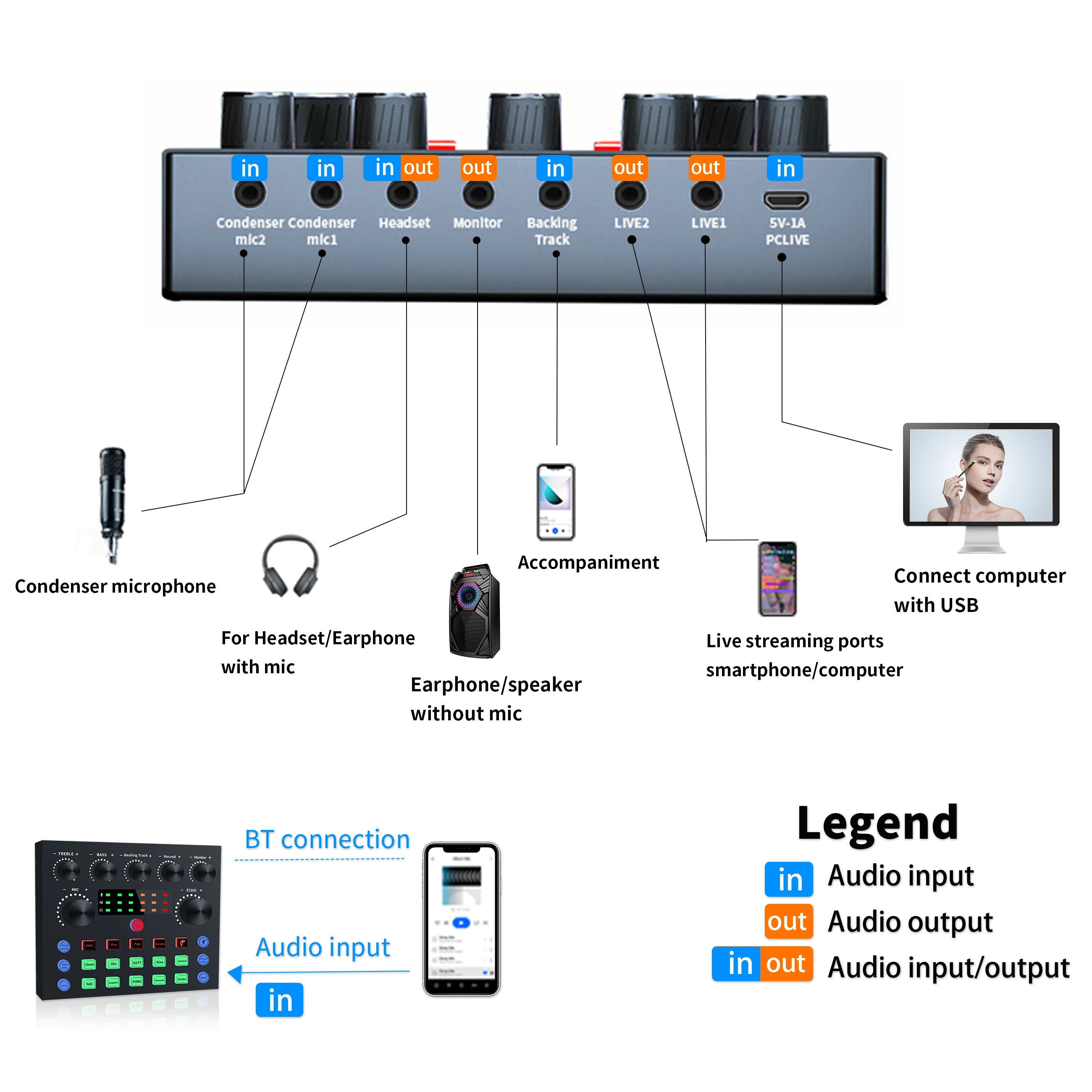
4. When using a computer for live broadcast or accompaniment, directly connect the computer USB input and the sound console`s PC port with the USB Do not use the sound console`s PC port to connect to a computer for charging. The computer will automatically detect and install the sound console drivers (a notification will show on the lower right corner of your screen).
5. If you hear loud sound or noise when using an iPhone for live broadcast, try setting the phone to silent. You can adjust volume from the console.
6. Wireless connectivity can only support accompaniment devices with BT. You can also use an AUX cable to connect to other accompaniment devices.
7. When listening to a live broadcast with a mobile phone, keep in mind that the phone used for listening should have some distance from the mobile phone used for the live broadcast as close proximity will cause signal interference and howling.
8. It is recommended that the volume of the microphone be turned down to reduce noise. If the sensitivity of the microphone is high, there may be noise or other undesirable sounds from the console.
9. External speakers are not recommended when using a computer for a live broadcast as sound from the speaker may be recorded by the microphone which will cause an echo effect. It is recommended to first unplug or turn off the speaker and use headphones during the live broadcast on the computer.
10. The “MONITOR” input is for earphones/headset without a mic and the “HEADSET” input is for earphone/headset with a mic. To be sure that you are using the correct input, try using both ports and listen for noise or interference from either port.
2. The sound card must be charged before use. Low battery can cause poor sound quality and low volume. It is also recommended that you do not use the sound console while it is being charged as that may cause interference.
3. When using the console, all inputs must be fully plugged in. If using a mobile phone with a case, it is recommended that the case be removed to avoid hitting the plug.
4. When using a computer for live broadcast or accompaniment, directly connect the computer USB input and the sound console`s PC port with the USB Do not use the sound console`s PC port to connect to a computer for charging. The computer will automatically detect and install the sound console drivers (a notification will show on the lower right corner of your screen).
5. If you hear loud sound or noise when using an iPhone for live broadcast, try setting the phone to silent. You can adjust volume from the console.
6. Wireless connectivity can only support accompaniment devices with BT. You can also use an AUX cable to connect to other accompaniment devices.
7. When listening to a live broadcast with a mobile phone, keep in mind that the phone used for listening should have some distance from the mobile phone used for the live broadcast as close proximity will cause signal interference and howling.
8. It is recommended that the volume of the microphone be turned down to reduce noise. If the sensitivity of the microphone is high, there may be noise or other undesirable sounds from the console.
9. External speakers are not recommended when using a computer for a live broadcast as sound from the speaker may be recorded by the microphone which will cause an echo effect. It is recommended to first unplug or turn off the speaker and use headphones during the live broadcast on the computer.
10. The “MONITOR” input is for earphones/headset without a mic and the “HEADSET” input is for earphone/headset with a mic. To be sure that you are using the correct input, try using both ports and listen for noise or interference from either port.
We Recommend







New Arrivals
New products from manufacturers at wholesale prices






