
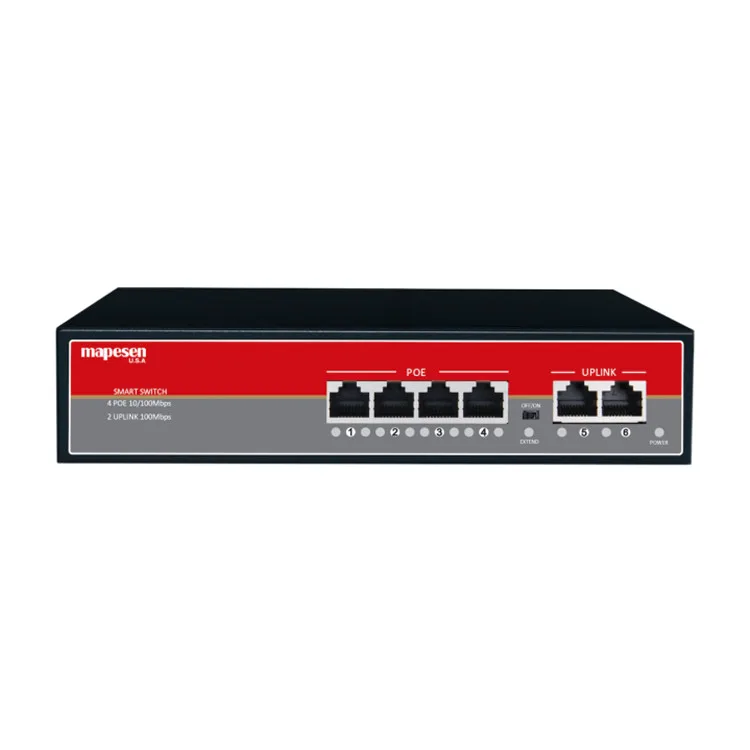
Ethernet switch 6 port 4 2 POE Switch Transmission Distance up to 100m 6 ports RJ45 Port Network Switches
- Category: >>>
- Supplier: Shenzhen Gevilion Technology Limited
Share on (1600463249684):
Product Overview
Description
Products Description
Ethernet switch 6 port 4+2 POE Switch Transmission Distance up to 100m 6 ports RJ45 Port Network Switches
Product Paramenters
FEATURES |
• PoE Port: 4 x 10/100Mbps RJ45 port,15.4W/30W per port |
• PoE data & power transmission distance:100meters(100Mbps),250meters(10Mbps) |
• Uplink Port: 2 x 100Mbps RJ45 port,Transmission Distance up to 100m |
• POE standard: IEEE802.3af/IEEE802.3at |
• Backboard Bandwidth: 1.2Gbps |
• POE type: 1/2+ 3/6- |
• Power adaptor: 52V 1.5A 72W |
• Size:202x140x45mm |
• Metal Case |
Recommend Products
Product packaging

Company Profile

Founded in 2008, with years' efforts, Gevilion has grown up to be a leading CCTV manufacturer located in Shenzhen, China with the certification ISO9001:2008 , and nowadays we have the factory with floor space around 50,000 square meters and over 1200pcs employees, which include housing production lines, SMT production lines, Cameras Production Lines, and XVR/NVR production lines. With complete quality/cost control, Gevilion has got absolute advantages to spread solutions, products and services in over 150 countries.
Exhibition

1.Warranty & RMA
(1) 2 years free repair and lifetime technical support provided after the shipment date.
(2) Any product proves defective under normal usage, we will repair or replace it by free of Charge.
> If you could repair the products by yourself, we will supply the spare parts.
> If you couldn't repair the products, please sent back to us, and we repair and afford 50% freight charge.
All our products are 100% passed strictly quality inspection before delivery. our detective rate is less than 1%
2. OEM & ODM
> OEM Silkprint LOGO/Sticker/Box/Manual/Software/Carton Box, Free of Charge with MOQ
> ODM Projects acceptable and welcome to your inquiries!
3. Payment Terms
T/T, Paypal, Western Union, Sinosure & L/C
> We accept T/T 30% deposit to arrange production,70% balance payment when goods ready.
> Sinosure & L/C acceptable according to the order amount
4. MOQ
Welcome trial order! Sample Order no MOQ; after sample order, MOQ 10pcs per model.
Silkprint OEM logo MOQ 100pcs, OEM Design box MOQ 1000pcs.
5. How to order from us?
> Please confirm the model no. & quantity that you would like to purchase with our sales person, or email to us
> We will send you a Proforma Invoice to specify net cost of mentioned goods, and other relevant charges once you confirm the
order.
> After you arrange the payment and send us the bank slip, Your order will be put into production, and let your know the delivery
date in 2 days.
> When the goods are ready, we will send by DHL, by air or by sea, or other shipping method appointed by the customers. and let
you know the tracking number and estimated time of arrival.
6.Technical Support
Professional technical support team 24 Hours Online!
(1) 2 years free repair and lifetime technical support provided after the shipment date.
(2) Any product proves defective under normal usage, we will repair or replace it by free of Charge.
> If you could repair the products by yourself, we will supply the spare parts.
> If you couldn't repair the products, please sent back to us, and we repair and afford 50% freight charge.
All our products are 100% passed strictly quality inspection before delivery. our detective rate is less than 1%
2. OEM & ODM
> OEM Silkprint LOGO/Sticker/Box/Manual/Software/Carton Box, Free of Charge with MOQ
> ODM Projects acceptable and welcome to your inquiries!
3. Payment Terms
T/T, Paypal, Western Union, Sinosure & L/C
> We accept T/T 30% deposit to arrange production,70% balance payment when goods ready.
> Sinosure & L/C acceptable according to the order amount
4. MOQ
Welcome trial order! Sample Order no MOQ; after sample order, MOQ 10pcs per model.
Silkprint OEM logo MOQ 100pcs, OEM Design box MOQ 1000pcs.
5. How to order from us?
> Please confirm the model no. & quantity that you would like to purchase with our sales person, or email to us
> We will send you a Proforma Invoice to specify net cost of mentioned goods, and other relevant charges once you confirm the
order.
> After you arrange the payment and send us the bank slip, Your order will be put into production, and let your know the delivery
date in 2 days.
> When the goods are ready, we will send by DHL, by air or by sea, or other shipping method appointed by the customers. and let
you know the tracking number and estimated time of arrival.
6.Technical Support
Professional technical support team 24 Hours Online!
Certifications

FAQ
FAQ About Camera:
1.Connect the recorder but without image.
1) Check whether the camera is energized.
2) If it’s energized, pls check the camera’s mode and standard whether match with recorder’s.
3) Check the VGA/HDMI cable is good.
4) After the above confirmation, contact the factory for inspection.
2.The image of recorder is not clear when connect.
1) Check the camera’s standard system whether match with recorder’s.
2) Check whether the lens is focusing clearly.
3) Check the lens and cover surface is clean. If there is dust or finger printed on the lens or cover surface, the picture quality
will be poor. Pls clean with soft cloth or the lens cleaning kit on the market.
3.After connect the recorder, there is interference of the image.
1) There is no strong electromagnetic field near the camera to produce interference.
2) Check whether the grounding is good.
3) Pls use high quality VGA/HDMI cable, and sure they are contact well.
4) Check the VGA/HDMI cable connect correctly.
5) The flash screen can be used to upgrade DVR/NVR, then make power off and restart it.
4.Connect recorder, the image is off color.
1) Check whether the recorder VGA/HDMI output cable is in good contact.
2) Change the environment, to avoid working in the special environment.
3) Right-click the main menu on the recorder >Management tools> Restore default(system upgrade).
5.The camera switches to night vision when the light still bright.
1) Pls check whether the installation environment is in the shadow, or the sun shield of shell is installed too front.
2) Remove the photosensitive filter on the lamp board, can reduce the sensitivity of light.
1.Connect the recorder but without image.
1) Check whether the camera is energized.
2) If it’s energized, pls check the camera’s mode and standard whether match with recorder’s.
3) Check the VGA/HDMI cable is good.
4) After the above confirmation, contact the factory for inspection.
2.The image of recorder is not clear when connect.
1) Check the camera’s standard system whether match with recorder’s.
2) Check whether the lens is focusing clearly.
3) Check the lens and cover surface is clean. If there is dust or finger printed on the lens or cover surface, the picture quality
will be poor. Pls clean with soft cloth or the lens cleaning kit on the market.
3.After connect the recorder, there is interference of the image.
1) There is no strong electromagnetic field near the camera to produce interference.
2) Check whether the grounding is good.
3) Pls use high quality VGA/HDMI cable, and sure they are contact well.
4) Check the VGA/HDMI cable connect correctly.
5) The flash screen can be used to upgrade DVR/NVR, then make power off and restart it.
4.Connect recorder, the image is off color.
1) Check whether the recorder VGA/HDMI output cable is in good contact.
2) Change the environment, to avoid working in the special environment.
3) Right-click the main menu on the recorder >Management tools> Restore default(system upgrade).
5.The camera switches to night vision when the light still bright.
1) Pls check whether the installation environment is in the shadow, or the sun shield of shell is installed too front.
2) Remove the photosensitive filter on the lamp board, can reduce the sensitivity of light.
We Recommend







New Arrivals
New products from manufacturers at wholesale prices






