
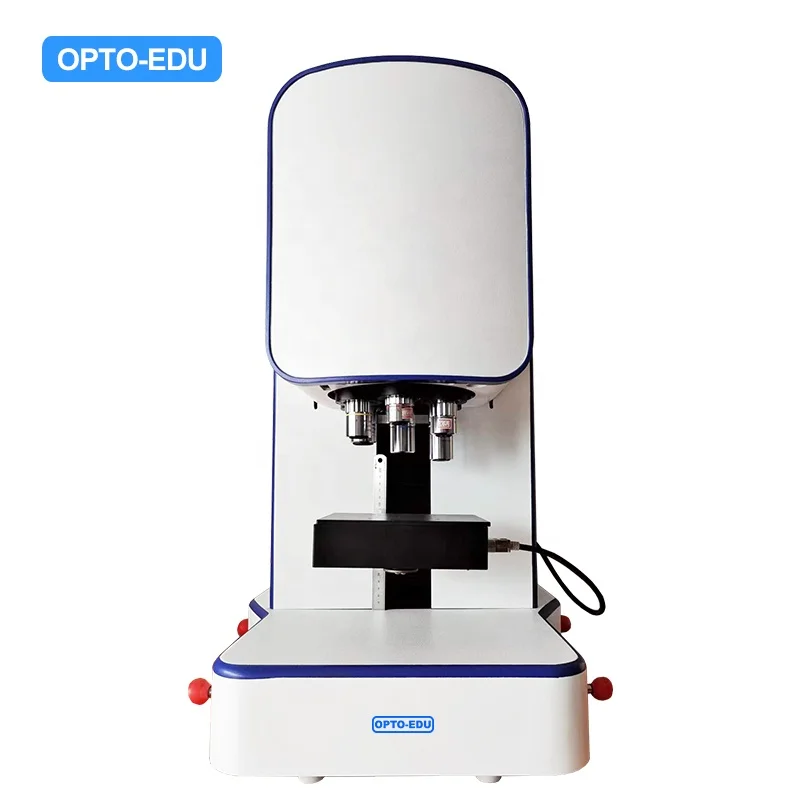
MAXCOPE M20.5850 All in One Marco Camera Motorized XYZ Industry Microscope
- Category: >>>
- Supplier: Opto-Edu (Beijing) Co. Ltd.
Share on (1600652819136):
Product Overview
Description

Full Auto Microscope Scanning Software
According to surface condition of the sample and the specific requirements of customers, Maxcope has 4 versions and more customized functions provided, which are suitable for the complex automatic microscopic scanning splicing work of the motorized microscope in medical, teaching, industrial, wafer processing and other fields.
A30.5801-2D
2D Version, Maxcope Series Standard Software
--Plane PXP Scan, Plane Fly Scan
--For XY Stage Model + 2C Computer
--For Plane Smooth Surface Or Low Magnification
Samples, No Autofocus Needed
--Single Focal Plane Scan, XY Stage Direct Scan
And Stitch 2D Image
--Plane PXP Scan, Plane Fly Scan
--For XY Stage Model + 2C Computer
--For Plane Smooth Surface Or Low Magnification
Samples, No Autofocus Needed
--Single Focal Plane Scan, XY Stage Direct Scan
And Stitch 2D Image
A30.5801-2DB
2DB Version, Maxcope Series Optional Software
--Including All 2D Function, Add:
--Bevel PXP Scan, Bevel Fly Scan
--For XYZ Stage Model +2C Computer
--For Bevel Smooth Surface Or High Magnification
Observation Of Thick Samples
--Auto Acquisition Height Of Multi-focal Planes,
After Modeling, Scan And Stitch 2D Image
--Including All 2D Function, Add:
--Bevel PXP Scan, Bevel Fly Scan
--For XYZ Stage Model +2C Computer
--For Bevel Smooth Surface Or High Magnification
Observation Of Thick Samples
--Auto Acquisition Height Of Multi-focal Planes,
After Modeling, Scan And Stitch 2D Image
A30.5801-2DF
2DF Version, Maxcope Series Optional Software
--Including All 2DB Function, Add:
--Up/Down Fast, Middle, Fine, Fusion Scan
--For XYZ Stage Model +3C Computer
--For Plane/Bevel/Uneven Surface
--Auto Focus On Multi-focal Planes, Scan And
Stitch 2D Image
--Including All 2DB Function, Add:
--Up/Down Fast, Middle, Fine, Fusion Scan
--For XYZ Stage Model +3C Computer
--For Plane/Bevel/Uneven Surface
--Auto Focus On Multi-focal Planes, Scan And
Stitch 2D Image
A30.5801-3D
3D Version, Maxcope Series Optional Software
--Including All 2DF Function, Add:
--3D Scan, 3D Measure
--For XYZ Stage Model +3C Computer
--For Plane/Bevel/Uneven Surface
--Auto Focus On Multi-focal Planes, 3D Scanning
And Stitching After Depth Fusion
--Including All 2DF Function, Add:
--3D Scan, 3D Measure
--For XYZ Stage Model +3C Computer
--For Plane/Bevel/Uneven Surface
--Auto Focus On Multi-focal Planes, 3D Scanning
And Stitching After Depth Fusion
More Depth Customization Functions
HDR Observation Function, DIC Detection Analysis, Professional Metallographic Analysis, Grain Size Analysis, Cleanliness Analysis, Hardness Tester Analysis and other customized solutions for various industries, which can be deeply customized according to the specific needs of different customers to fully meet the complex work needs

XY Motorized Control
The XY direction movement of the electric platform is controlled by the software. There are various control methods. You can directly drag the window to move the platform manually, or you can double-click any point of the image, to move stage to interesting point quickly.

Z Motorized Control
The software controls the Z-axis electric lift, to accomplish professional functions such as manual focus/auto focus/super depth of field fusion. One-button autofocus, focusing speed accuracy can be selected.


High Speed – Fly Scan Mode
After setting the scanning range of bevel or uneven surface, the software will automatically select 9 acquisition points, automatically focus and record the height respectively, and establish a height model. Then fly scan can move Z axis according to height model and take photos quickly and stitch 2D panoramic scan images at high speed.

High Resolution – Scan Under 40x,100x
In addition to the basic XY motorized scanning and stitching, the advanced 2D scanning mode can simultaneously perform continuous scanning along the Z axis until the focus is found or depth of field fusion is made, and then panoramic stitching is performed.
Even for industrial samples with uneven surfaces, or biological slices with uneven thickness under high magnification 40x or 100x, high-resolution 2D or 3D scan images with clear focus in all areas can be obtained
Even for industrial samples with uneven surfaces, or biological slices with uneven thickness under high magnification 40x or 100x, high-resolution 2D or 3D scan images with clear focus in all areas can be obtained

Free Stitching Area
The scan area can be automatically recognized by the software (the contour line mode automatically detects the edge contour of the object). Software also provides a variety of manual selection scan area modes, free curve mode can draw any shape as splicing area

Stitching Optimize
The built-in advanced algorithm can intelligently optimize and correct the grid phenomenon and shadow phenomenon caused by lens aberration, uneven lighting and other factors when scanning and stitching, so that the stitched image will be one high-definition, no offset, no grid, no shadow.

All Kind 2D Measurement
2D plane measurement function, length, angle, radius, diameter, free-form curve length, parallel line distance, point-line distance, 2-point distance, multi-point distance, radius, diameter, arc length, RGB measurement, counting and other 10 kinds of measurements mode, and provides a variety of auxiliary lines, reference line tools, free coordination can achieve various complex measurements

One Key Auto Measurement
Multiple measurement items can be saved as templates, the software intelligently matches similar shapes, removes redundant targets or separates overlapping targets, and automatically performs unified measurement, counting and analysis for multiple targets with one key.

Freely Remark And Output Reports
Remark information can be freely inserted and displayed in the microscope video window and 2D map window. The annotation content, ruler, color, line, etc. can be freely set, and output to the experimental report along with the image

Max Area Measurement
Just use the mouse to specify the measurement range, the software automatically detects the edge of the object and selects the measurement area, you can add or delete measurement areas at will, and measure the largest area of any complex shape by automatic edge recognition instead of manual precise positioning

3D Stitching
It can take pictures of uneven observation objects after auto-focusing at different heights, obtain a full-frame clear 2D image synthesized from all clearly focused images, and stitch together to form a 3D image, and retain all the 3D measurement data of the observed object for later observation and analysis. Measurement. Super powerful algorithm can achieve 200-500 layers of fusion.

3D Image Comparision
Two 3D images can be opened at the same time, synchronously rotated, zoomed in and out, compared and analyzed, and the comparison results such as height difference and shape difference can be automatically displayed through color identification

3D Image View
The saved 3D image can be opened at any time, controlled by the mouse to rotate freely, zoom in and out, open the ruler, color identification and other auxiliary tools, which is convenient to visually observe the two-dimensional surface shape and three-dimensional structure of the object from any angle, and thoroughly and clearly understand the observed object. object

3D Measurement
3D image also saves all the three-dimensional measurement data of the observed object, and supports any measurement of the observed object later, including the height, depth, length, roughness, convex area, concave area, convex volume, concave volume, etc.


M20.5850 Gantry Type Industrial Automatic 3D Microscopic Scanning Measurement System | ||||
Main Body | Size | 350X450X690mm | ||
Weight | 36kg | |||
Nosepiece | 6 Holes Coding Motorized Nosepiece | |||
Objective | Infinity LWD Metallurgical Semi-APO 5x, 10x, 20x, 50x, 100x | |||
View Method | Reflect LED, Polarizing (Optional), DIC (Optional) | |||
LED Life Time | 40000 Hours | |||
XYZ Motorized Stage | Repeatability | 15um (Standard), 3um (Optional) | ||
Moving Speed | 12mm/sec (max) | |||
Moving Range | 50x50mm | |||
Stage Size | 150x170mm | |||
Stage Load | 10kg | |||
Round Stage | 360° Rotatable, 30° Incline Angle Adjustable (Optional) | |||
Z Motorized Control | Auto Focus | Auto Focus Speed 0.3 Second (Fastest),Normally 1-3 Seconds | ||
Z Resolution | 0.1um | |||
Moving Speed | 20mm/sec(max) | |||
Moving Range | 20mm | |||
Micro Camera | A59.2213-9MPA Digital Camera | 9.0M USB3.0 GS Shutter Digital Camera, 1” CMOS, C-Mount, FPS 34@4096x2160, 60@2048x1080, G Sensitivity Dark Signal 1146m with 1/30s | ||
Marco Camera | View Field Up To 70mm * 90mm, Resolution 0.2mm (Optional) | |||
Computer | A30.5801-3C | Dell Xeon W-2265 12 Core 3.5GHz, 128G+1T NVMe 4T, RTX4000-8G, 27" 4K, Pre-Installed Maxcope Software. | ||
Software | A30.5801-3D | 3D Version, Detail See Maxcope Software Version Table | ||
Image Format | Output | JPEG,TIFF | ||
Other | Voltage | 110-220VAC,60/50Hz | ||
Power Supply | 80W | |||
Working Temp. | 10°~38°C | |||
Working Humidity | 10%~90%(No Condensation) | |||
Motorized Working Stage, Computer & Software | ||||||
Motorized Working Stage | XYZ Motorized Working Stage, 2-Phase Stepping Motor, High Precision Module, Aluminum Alloy Material, Surface Anodized, Anti-Corrosion And Scratch-Resistant | ● | A54.5802 | |||
Size | 150x170mm | |||||
XYZ Moving | 50x50x200mm | |||||
Resolution | <0.05um | |||||
Repeatability | ≤10um, Upgradeable to <3um | |||||
Maxcope Software | 2D, Plane Scan, For XY or XYZ Stage+2C Computer | ○ | A30.5801-2D | |||
2DB, Add Bevel Scan, For XYZ Stage+2C Computer | ○ | A30.5801-2DB | ||||
2DF, Add Up/Down Fusion Scan, For XYZ Stage+3C Computer | ○ | A30.5801-2DF | ||||
3D, Add 3D Scan, For XYZ Stage+3C Computer | ● | A30.5801-3D | ||||
Customized Function, Detail See Maxcope Software Version Table | ○ | A30.5801-CF | ||||
Computer | Dell i5 64G 256G+1T, 2G Graphic, 27" 4K, Pre-Installed Maxcope Software. Standard Computer For 2D, 2DB Version Software | ○ | A30.5801-2C | |||
Dell Xeon W-2265 12 Core 3.5GHz, 128G+1T NVMe 4T, RTX4000-8G, 27" 4K, Pre-Installed Maxcope Software. Standard Computer For 2DF, 3D Version Software | ● | A30.5801-3C | ||||
Maxcope Software Version Table | ||
2D Version (Standard Version, For XY or XYZ Stage + 2C Computer) | ||
XY Motorized Control | Control the motorized stage through software, support one-click set/return to origin point, three ways control methods: • Click the 8-direction arrow with the mouse to manually control the stage movement, and the step distance and move speed can be freely adjusted • Long press the mouse and drag in the camera preview window, to move the working stage to the corresponding direction • Double-click the mouse at any point in the preview window, the point will be set as center of the window, the stage will move accordingly | |
2D Plane Scan | 2 kinds plane scan modes, no need auto or manual focus during stitching, for plane smooth surface or low magnification view, XY stage will direct scan single focal plane and stitch the 2D image • Plane PXP Scan, point by point, high precision, slow speed • Plane Fly Scan, line by line, low precision, high speed Supports automatic scanning and stitching of 2D images at any magnification, with optional scanning accuracy and speed. | |
Free Stitching Area | Provides 6 stitching area modes, which can quickly set stitching areas of any shape: Polygon, 2-point rectangle, 3-point circle, 4-point ring, outline, free curve. • Outline mode can automatically detect the edge contour of the object as the stitching area. • Free curve mode can freely draw any shape as the stitching area. | |
2D Stitching Optimize | The built-in advanced algorithm can intelligently optimize and correct the grid phenomenon and shadow phenomenon caused by lens aberration, uneven lighting and other factors when scanning and stitching, so that the stitched image will be one high-definition, no offset, no grid, no shadow. | |
Calibration | It can do the necessary calibration before measurement, for different camera & objective lenses, user can add, delete, and manage the calibration list at any time | |
2D Measurement | 2D plane measurement 10+ functions, including length, angle, radius, diameter, free curve length, parallel line distance, point-line distance, 2-point distance, multi-point distance, radius, diameter, arc length, RGB measurement, counting, etc. and a variety of auxiliary lines and reference line tools are provided. Combined with these tools, various complex measurements can be achieved, and various measurable information of planar images can be obtained more efficiently. | |
2D Map Guide | After scanning and stitching to generate a panoramic image, it can be used as an electronic 2D map for navigation. Click the 2D map to control the motorized stage to quickly locate the specified position for high-magnification observation, avoiding the confusion of difficult positioning in traditional high-magnification observation. | |
Point of Interest | Click the mouse to freely set and save multiple points of interest on the image, you can select and quickly return to the point of interest at any time for repeated focus observation | |
Marco Camera Guide | The model with optional macro camera, the panoramic image previewed in real time can be used as an electronic 2D map for navigation function, one click can reach the point of interest for high-power observation | |
Motorized Nosepiece | Optional motorized nose wheel models, you can select different objective lenses in the software, and switch the magnification with one click | |
Full Parameter Record | While taking pictures and videos, software can automatically records comprehensive information such as shooting date, objective lens, magnification, stage position, etc., which is convenient for outputting to experimental reports or for reproducing observation results later. | |
Extra Long Video Record | The longest 1 hour, the fastest 50PFS video recording, can comprehensively record the experimental detection process, or the long-term change process of the observed object, subtle movements and other information. The video results can be fast-forwarded or played frame by frame, and still images can be extracted and saved. | |
Customized Report | Freely set Word and Excel report templates, including images and comprehensive shooting parameters, which is convenient for quickly outputting a complete inspection report in the later stage | |
Free Interface | The software interface and each submenu can be freely settled by dragging and dropping with the mouse, and can be saved, exported, and imported into the customized interface layout, and the default simple interface can also be restored easily by hot key Ctrl + G. | |
Multi Language | The software supports Simplify Chinese, Traditional Chinese, English, Russian, Korean, Japanese, Iranian, Dutch, French, German, Italian, and other language versions can be customrized. | |
2DB Version (2D + Below Functions, For XYZ Stage + 2C Computer) | ||
Z Motorized Control | The software controls the Z-axis motorized lift, support professional functions such as manual focus/auto focus/super depth of field fusion • Click the up and down arrows with the mouse to manually control the Z-axis lift and focus • One-click autofocus, focusing speed & accuracy can be selected | |
2D Bevel Scan | 3 kinds Bevel Scan modes, can auto acquisition height of multi-focal planes, after modeling, scan and stitch 2d image, especially suitable for bevel smooth surface, • Bevel PXP Scan, Point by Point • Bevel Fly Scan. Manual Focus • Bevel Fly Scan Auto Focus | |
Auto Focus | One click autofocus, as quick as 0.3-2 seconds for each focus, focusing accuracy and speed are optional | |
2DF Version (2DB + Below Functions, For XYZ Stage + 3C Computer) | ||
2D Fusion Scan | 4 kinds of auto focus stitching modes up and down, with Z-axis motorized, you can focus on the inclined plane and the concave-convex surface layer by layer along the Z axis to find the correct focal plane, or after the depth of field fusion of multi-layer images, then scan and stitch into a clear full frame 2D images, especially suitable for complex industrial inspection, special slice observation and other fields • Up/Down Scan, Fast • Up/Down Scan, Middle • Up/Down Scan, Fine • Up/Down Scan, Fusion | |
Depth Fusion | The innovative design of high-quality depth synthesis can easily do 200~500 layers of super depth of field superposition and fusion in a short period of time. The software makes intelligent judgment on abnormal high and low points, scans with full coverage, and obtains full-frame clear focus pictures | |
Auto Edge Selection | When the measurement point manually selected by the mouse is deviated on the screen, the software can automatically detect the edge of the target and automatically correct the measurement point to the edge to eliminate human error and improve the efficiency of measurement range selection | |
3D Version (2DF + Below Functions, For XYZ Stage + 3C Computer) | ||
3D Scan | 3D stitching mode, which can automatically focus on uneven objects, take pictures at different heights, obtain a full-frame clear 2D image composed of all clearly focused images, and stitch all focused image together to form a 3D image, and retain all the 3D measurement data of the observed object. • 3D Stitching | |
3D Image View | The saved 3D image can be opened at any time, controlled by the mouse to rotate freely, zoom in and out, open the ruler, color identification and other auxiliary tools, which is convenient to visually observe the 2D surface shape and 3D structure of the object from any angle, and thoroughly and clearly understand the observed object | |
3D Measurement | The 3D image also saves all the three-dimensional measurement data of the observed object, and supports any measurement of the observed object later, including the height, depth, length, roughness, convex area, concave area, convex volume, concave volume, etc. | |
3D Image Comparision | Two 3D images can be opened at the same time, synchronously rotated, zoomed in and out, compared and analyzed, and the comparison results such as height difference and shape difference can be automatically displayed through color identification | |
3D Manual Stitching | Support manual stage models, only need to manually lift the stage, the software automatically scans and takes pictures and stitches to form 3D images, upgrade manual stage model to do semi-automatic 3D scanning and stitching work. | |
Multi Files Comparison | Multiple files can be opened at once for cross-section, volume, area, flatness, roughness measurements, and more. Even if there are multiple evaluation samples, analysis can be performed instantaneously under the same conditions. It is possible to see at a glance where and what differences exist, such as changes in shape due to prototypes with different manufacturing conditions or wear. Not only can measurement work be significantly reduced, but evaluation errors caused by deviations in measurement conditions can also be prevented.。 | |
CF Version Customized Function Module For Special Observation | ||
HDR | Acquires multiple ultra-clear images using a single wavelength of light and images with different shutter speeds, and turns them into 1 image with high grayscale data. Achieved unprecedented high-definition, high-contrast observation | |
DIC | The automatic turret of the six-hole objective lens, combined with the adjustment of the DIC prism, can make the height difference of the objective lens surface produce obvious relief effect, greatly improve the contrast of the image, and facilitate the user to analyze efficiently and accurately. Combined with polarized light observation, DIC can reflect the smallest surface morphology differences as brightness differences, and can display perfect images even for low-contrast, multi-phase samples and reflective materials. | |
Cell Count & Analysis | Through the automatic focusing acquisition method, high-definition scanning and splicing images of multiple areas are simultaneously obtained, and the number, concentration, diameter, and area of cells are statistically analyzed. The speed is fast and the identification is accurate. | |
Metallurgical Analysis | Using automatic image stitching, the image is analyzed through image enhancement, contrast adjustment, scratch processing, image correction, multi-region image segmentation, morphological processing, image annotation, and layer merging processing methods. It is easy to use and concise, and the measurement is accurate and reliable. | |
Cleanliness Analysis | Cleanliness analysis can be performed according to standards such as ISO Standard 16232, VDA 19.1-2015, ISO 16232, ISO4406 and ISO 4407. At the same time, it supports user-defined rating standard rules. Divide a large area into multiple areas to shoot and analyze them individually, and you can deal with a wide range of cleanliness analysis. The number of particles extracted and the cleanliness class can be displayed for each largest diameter class (B to K). Also provides height information for selected particles. | |
Vickers/Knoo Hardness Test Auto Analysis | Efficient and fast panorama scanning, diversified path planning, automatic continuous loading, focusing, and measurement are convenient for users to obtain accurate measurement results and greatly improve work efficiency. | |
Brinell Hardness Tester Analysis | One-Click automatic identification function is significantly ahead of the existing mainstream Brinell hardness tester software products. | |
Porosity Measurement | The system complies with VW50097, VW50093, VDG_P202 standards, and the whole image is obtained by panoramic stitching for analysis, so that the porosity measurement can obtain more reliable results in the entire analysis area. | |
Grain Size Analysis | According to JIS standard G0551 or ASTM standard E1382, the measurement line can select [vertical line], [horizontal line], [diagonal line], [multiple circles] to measure the crystals on test line. | |
One Click Auto Measurement | Multiple measurement items can be saved as templates, the software intelligently matches similar shapes, removes redundant targets or separates overlapping targets, and automatically performs unified measurement, counting and analysis for multiple targets with one click | |
Max Area Measurement | Just use the mouse to specify the measurement range, the software automatically detects the edge of the object and selects the measurement area, you can add or delete measurement areas at will, and measure the largest area of any complex shape by automatic edge recognition instead of manual precise positioning | |

We Recommend







New Arrivals
New products from manufacturers at wholesale prices






