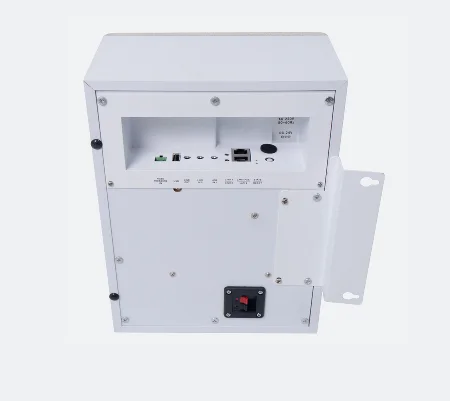

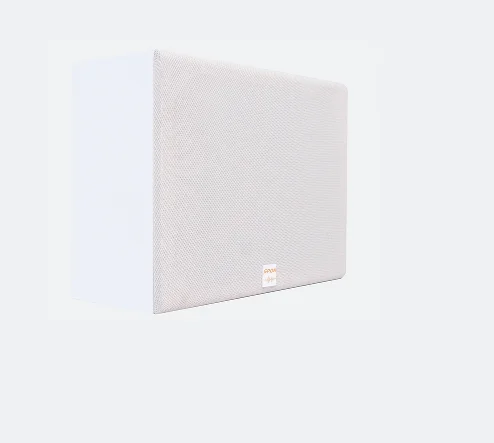
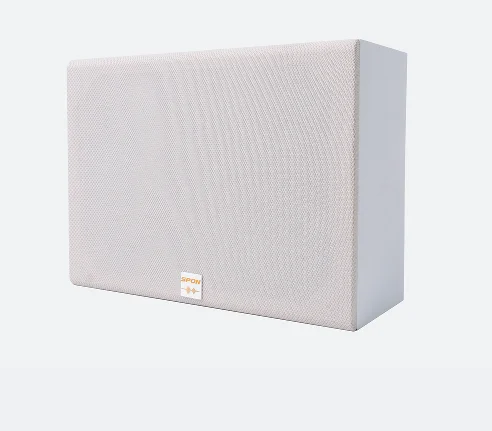
XC 9602B IP Cabinet Speaker IP Audio Speaker Bass Reflex Subwoofer Speaker
- Category: Broadcast\u00A0Intercom\u00A0Systems >>>
- Supplier: Spon Communications Co. Ltd.
Share on (1600887051197):
Product Overview
Description
Description

» ALL-IN-ONE SPEAKER
SPON™ XC-9602B is an all-in-one speaker with built-in network audio decoder, class-D digital amplifier and DSP (digital signal
processor), there's no need for any additional audio equipment to build up a complete system. Pre-configured digital signal
processing delivers clear, understandable voice messages right out of the box.
processor), there's no need for any additional audio equipment to build up a complete system. Pre-configured digital signal
processing delivers clear, understandable voice messages right out of the box.
» EASY CONFIGURATION
After connecting the cabinet speaker to the existing LAN/WAN network, you can easily manage and configure the speaker using its
own user-friendly web interface accessible via the speaker's IP address, no need of tricky programming.
When you first log into the web GUI, after setting the IP address of the server (the PC on which SPON™ XC-9000 management software
was installed), you can easily assign a static IP address to the speaker. Apart from the settings of network parameters, you can
also use the web GUI to configure other parameters of the speaker such as speaker volume, offline bell ringing volume, LED clock
brightness, web interface login username & password, etc.
own user-friendly web interface accessible via the speaker's IP address, no need of tricky programming.
When you first log into the web GUI, after setting the IP address of the server (the PC on which SPON™ XC-9000 management software
was installed), you can easily assign a static IP address to the speaker. Apart from the settings of network parameters, you can
also use the web GUI to configure other parameters of the speaker such as speaker volume, offline bell ringing volume, LED clock
brightness, web interface login username & password, etc.
» AUTOMATIC TROUBLESHOOTING
Thanks to the loop detection function, whenever the speaker receives digital audio signal from SPON™ XC-9000 management software,
the built-in microphone inside of the speaker will pick up the sound from the speaker, judging if there's any malfunction on the
speaker or the circuits, and then send corresponding feedbacks to SPON™ XC-9000 management software.
the built-in microphone inside of the speaker will pick up the sound from the speaker, judging if there's any malfunction on the
speaker or the circuits, and then send corresponding feedbacks to SPON™ XC-9000 management software.
» POWER FOR AUXILIARY PASSIVE SPEAKER
» UNIFIED COMMUNICATOIN COMPATIBILITY
SPON™ XC-9602B IP cabinet speaker is compatible with standard SIP (RFC3261) protocol, it can be directly registered on mainstream
3rd party VoIP telephone system for live paging announcement.
3rd party VoIP telephone system for live paging announcement.

If you want to achieve more advanced functionalities of the speaker, such as pre-recorded voice announcements, scheduled or
event-triggered voice announcements, real-time and timed background music, offline scheduled bell ringing, etc., you'll need to
register the speaker on SPON™ XC-9000 management software. But at the same time, if you already have an existing on-premise or
hosed/cloud VoIP telephone system and would like use your VoIP phone to make live paging announcements to the speaker, this won't
be a problem, you can simply set up an interconnection between your existing VoIP telephone system and SPON™ XC-9000 management
software via SIP trunking, enabling outbound phone calls from your existing VoIP phone to the cabinet speaker.
event-triggered voice announcements, real-time and timed background music, offline scheduled bell ringing, etc., you'll need to
register the speaker on SPON™ XC-9000 management software. But at the same time, if you already have an existing on-premise or
hosed/cloud VoIP telephone system and would like use your VoIP phone to make live paging announcements to the speaker, this won't
be a problem, you can simply set up an interconnection between your existing VoIP telephone system and SPON™ XC-9000 management
software via SIP trunking, enabling outbound phone calls from your existing VoIP phone to the cabinet speaker.

» LIVE AND PRE-RECORDED VOICE ANNOUNCEMENTS
You can easily make live voice announcements to the speaker from 3rd party VoIP telephone system, SPON™ IP paging console, headset
connected to your PC/laptop (using the real-time capture & playback function of SPON™ XC-9000 management software) or even your
smartphone (XC-APP Android & iOS Smartphone App).
connected to your PC/laptop (using the real-time capture & playback function of SPON™ XC-9000 management software) or even your
smartphone (XC-APP Android & iOS Smartphone App).

As for making pre-recorded voice announcements, you can either choose to upload the pre-recorded voice announcement MP3/WAV audio
files to the media library of SPON™ XC-9000 management software, or simply put the audio file in the USB flash drive and play the
audio file on SPON™ IP paging console.
files to the media library of SPON™ XC-9000 management software, or simply put the audio file in the USB flash drive and play the
audio file on SPON™ IP paging console.
» SCHEDULED VOICE ANNOUNCEMENTS
With the help of SPON™ XC-9000 management software, you'll be able to broadcast the right voice message at the right time.
This innovative speaker has the functionality of scheduled voice announcements, you can simply set up a scheduled voice
announcement task on SPON™ XC-9000 management software (please check the detailed setup procedures as below). After the setup of
the task, the corresponding pre-recorded voice announcement will be played on the speaker at the specified time.
This innovative speaker has the functionality of scheduled voice announcements, you can simply set up a scheduled voice
announcement task on SPON™ XC-9000 management software (please check the detailed setup procedures as below). After the setup of
the task, the corresponding pre-recorded voice announcement will be played on the speaker at the specified time.
Detailed Setup Procedures of Scheduled Voice Announcement Task:
① Creat a new scheme on SPON™ XC-9000 management software and rename it as "Scheduled Voice Announcement".
② Creat a new task in the new scheme.
③ Set the trigger of the new task to be [Timer], set the period type to be [Daily]/[Weekly]/[Once], and set the start & end date
as well as the execution time of the task.
④ Set the operation of the new task to be [PA], set the audio source type to be [File], choose the corresponding pre-recorded
voice announcement MP3/WAV audio file in the media library, and choose the designated speaker as the target terminal.
② Creat a new task in the new scheme.
③ Set the trigger of the new task to be [Timer], set the period type to be [Daily]/[Weekly]/[Once], and set the start & end date
as well as the execution time of the task.
④ Set the operation of the new task to be [PA], set the audio source type to be [File], choose the corresponding pre-recorded
voice announcement MP3/WAV audio file in the media library, and choose the designated speaker as the target terminal.
» REAL-TIME AND TIMED BACKGROUND MUSIC
After registering the cabinet speaker on SPON™ XC-9000 management software, there're 5 different ways to initiate real-time
background music to the speaker:
● Play music via music streaming service (such as Spotify, Apple Music, YouTube Music, etc.) on your PC/laptop with real-time
capture & playback function of SPON™ XC-9000 management software (the sound card of your PC/laptop must support stereophonic
mixing).
● Play the pre-uploaded music files in the media library of SPON™ XC-9000 management software on your PC/laptop.
● Play the pre-stored music files in the USB flash drive on SPON™ IP paging console.
● Play music via music streaming service (such as Spotify, Apple Music, YouTube Music, etc.) on your smartphone/tablet/MP3 player
and connect your smartphone/tablet/MP3 player to the Aux Input (3.5mm TRS jack) of SPON™ IP paging console.
● Play the pre-uploaded music files in the media library of SPON™ XC-9000 management software via XC-APP Android & iOS Smartphone
App on your smartphone.
background music to the speaker:
● Play music via music streaming service (such as Spotify, Apple Music, YouTube Music, etc.) on your PC/laptop with real-time
capture & playback function of SPON™ XC-9000 management software (the sound card of your PC/laptop must support stereophonic
mixing).
● Play the pre-uploaded music files in the media library of SPON™ XC-9000 management software on your PC/laptop.
● Play the pre-stored music files in the USB flash drive on SPON™ IP paging console.
● Play music via music streaming service (such as Spotify, Apple Music, YouTube Music, etc.) on your smartphone/tablet/MP3 player
and connect your smartphone/tablet/MP3 player to the Aux Input (3.5mm TRS jack) of SPON™ IP paging console.
● Play the pre-uploaded music files in the media library of SPON™ XC-9000 management software via XC-APP Android & iOS Smartphone
App on your smartphone.

Connection Diagram

Product Description
Specification
Power Supply: | AC 220V 50Hz |
Power Consumption: | ≤65W |
Rated Power Output: | 2×30W |
Network Protocol: | SIP 2.0 (RFC 3261), FTP, HTTP, TCP/IP, UDP, ARP, ICMP, IGMP |
Audio Codec: | MP3, PCM/L16, ADPCM |
Maximum SPL: | 101dB±3dB |
S/N (Signal-to-Noise) Ratio: | ≥80dB |
Frequency Response: | 35Hz-18kHz |
Auxiliary Speaker Output: | 8Ω (Low-Impedance) |
Interface: | 2×RJ45 Ethernet Port, 1×USB 2.0, 2×Line Input (1/8” TS Jack), 1×Line Output (1/8” TS Jack), 1×Auxiliary Speaker Output (8Ω), 1×Power Input |
Dimensions: | 290×215×117mm |
Weight: | 3.3kg |
Standard Accessories: | 1×8.2 ft. 1/8” Male to Male Audio Cable, 1×Installation Manual |
Optional Accessories: | Fixed Power Cord (US/EU/UK/AU) |
Company Profile


With over 20 years of experience in audio IoT research, development, and production, SPON stands at the forefront of the industry. Our state-of-the-art acoustic noise reduction laboratory, fully automated SMT factory, and spacious company premises spanning 15,000 square meters reflect our commitment to innovation and excellence.
Our Advantages


SPON's advantages lie in our technological expertise, customized approach, extensive experience, comprehensive support, state-of-the-art facilities, and unwavering commitment to quality. These factors set us apart and make us the preferred choice for audio technology solutions in the IoT industry.
SPON's Proud Team


FAQ
Q: How can I contact SPON's customer support team?
A: You can reach out to our customer support team through our hotline, email, or online support platform. Our dedicated team will promptly respond to your inquiries and provide the necessary technical supportand solutions.
Q: Does SPON offer OEM/ODM services?
A: Yes, SPON provides OEM/ODM services. We have extensive experience in working with clients to develop and manufacture customized products according to their specific requirements and branding needs.
Q: What are the benefits of choosing SPON for OEM/ODM services?
A: By choosing SPON for OEM/ODM services, you can benefit from our expertise in audio technology, extensive manufacturing capabilities, and dedicated team of professionals. We can help you bring your ideas to life, offering flexible customization options, quality assurance, and timely delivery of products. Our goal is to collaborate closely with you to create innovative and tailored solutions that meet your unique business needs.
A: Yes, SPON provides OEM/ODM services. We have extensive experience in working with clients to develop and manufacture customized products according to their specific requirements and branding needs.
Q: What are the benefits of choosing SPON for OEM/ODM services?
A: By choosing SPON for OEM/ODM services, you can benefit from our expertise in audio technology, extensive manufacturing capabilities, and dedicated team of professionals. We can help you bring your ideas to life, offering flexible customization options, quality assurance, and timely delivery of products. Our goal is to collaborate closely with you to create innovative and tailored solutions that meet your unique business needs.
We Recommend


New Arrivals
New products from manufacturers at wholesale prices