
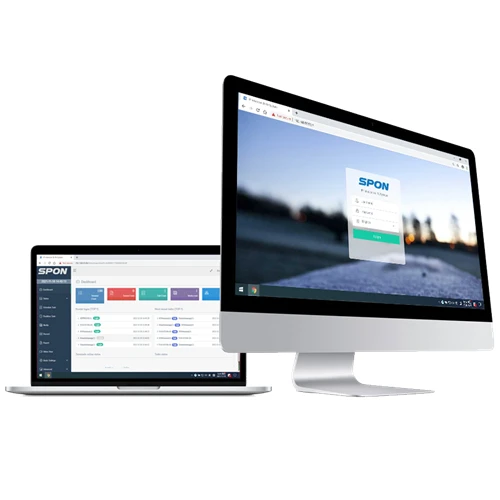
SPON XC 9000 IP Network Public Address PA Paging Intercom System Software
- Category: >>>
- Supplier: Spon Communications Co. Ltd.
Share on (1600918270522):
Product Overview
Description
Products Description

» B/S Software Architecture
This innovative software operates on a browser/server (B/S) structure. Once the software is installed on the main database server, other users can access the user interface through their own browsers, provided their PCs or laptops are on the same Local Area Network (LAN) as the main database server. Compared to the conventional client/server (C/S) architecture, the B/S architecture can significantly reduce the client computer's load. This reduction not only lowers the cost and workload of system maintenance but also greatly enhances the efficiency of software upgrading.

Additionally, our browser-based software provides advanced user access controls. Administrators can assign specific roles and permissions, allowing tailored access with unique usernames and passwords. This ensures system security while allowing flexibility for multiple users.
» Simple Installation And Setup
Simply install the management platform (ICPAS Controller) on the main database server, then open your browser (recommended: Google Chrome), input the local IP address of the server into the address bar, and press Enter. A software license dialog box will pop up automatically.

After completing the software licensing process, you'll be directed to the login interface. Simply enter your username and password, and you can then dive into exploring the management software at your leisure.

» Superior Sound Quality
Utilizing industry-leading DSP (Digital Signal Processing) and multi-channel audio technology, our management software delivers real-time capture and playback capabilities at 44.1kHz for uncompressed digital audio. This ensures exceptional sound quality for live voice announcements and real-time music broadcasts.

» High Loading Capacity
Our management software can simultaneously support up to 1000 IP audio endpoints. All registered IP endpoints are centralized on a single platform, ensuring streamlined management. Given its vast loading capacity, our software is versatile enough for projects of any scale. Whether it's for a small-scale PA system in a mosque or a grand-scale undertaking like a smart city, our software is an ideal choice.

» Centralized Device Management
Leverage our top-tier IP audio software platform to seamlessly manage all your IP audio endpoints, including IP mics, amplifiers, adapters, and speakers, right from a browser interface.

» Remote Volume Adjustment
Another standout feature of our server software is the ability to remotely control the volume of any IP endpoint directly through our browser-based interface.

» Flexible Zone Management
IP-based PA systems offer a significant time-saving advantage: the ability to simultaneously broadcast varied announcements or music to distinct zones.
Our software enables intuitive zone customization. Easily group various IP audio endpoints into zones, rename them, and view the list on the server software's user interface. When making announcements, you can select from this list. Moreover, a single IP endpoint can belong to multiple zones at once.
Our software enables intuitive zone customization. Easily group various IP audio endpoints into zones, rename them, and view the list on the server software's user interface. When making announcements, you can select from this list. Moreover, a single IP endpoint can belong to multiple zones at once.

» Live and Pre-Recorded Voice Announcement
Our cutting-edge software provides multiple avenues for live voice announcements. Whether it's from a 3rd party VoIP phone, SPON SIP paging mic, a PC/laptop headset (leveraging the XC-9000 server software's real-time capture & playback), or even your smartphone using the XC-APP, you're covered.
For pre-recorded messages, either upload the audio to the server software's music library or play it directly from a USB flash disk using the SPON SIP paging mic.
For pre-recorded messages, either upload the audio to the server software's music library or play it directly from a USB flash disk using the SPON SIP paging mic.
Our management software boasts an advanced integrated TTS (Text-To-Speech) engine powered by iFLYTEK.
For live announcements:
1. Select [Speech Synthesis] as the broadcast type.
2. Adjust the speech rate and background music to your preference.
3. Enter your desired message in the provided text box.
4. Choose the intended IP endpoint or paging zone.
5. Click the [Start] button.
6. The text is automatically converted into audio and broadcast in real-time.
For live announcements:
1. Select [Speech Synthesis] as the broadcast type.
2. Adjust the speech rate and background music to your preference.
3. Enter your desired message in the provided text box.
4. Choose the intended IP endpoint or paging zone.
5. Click the [Start] button.
6. The text is automatically converted into audio and broadcast in real-time.

» Real-time and Timed Music Broadcasting
With our intuitive server software, you can effortlessly initiate real-time music broadcasting directly from your PC/laptop. Opt for the software's real-time capture & playback function (ensure your PC/laptop's sound card supports stereophonic mixing) or simply play from the pre-uploaded tracks in the media library.

» SIP Trunking
If your enterprise already has an on-premise VoIP telephone system and you wish to make live announcements using the existing VoIP telephone to the SPON IP PA system, it's straightforward. Just use the SIP trunk to connect our management software with your 3rd party IP PBX. This integration facilitates both inbound and outbound calls between your current VoIP telephone and SPON IP audio endpoints.


setups.
» Emergency Notification Alert
For safety, security, and emergency alerts, you can easily integrate third-party conventional or addressable fire alarm systems into the SPON IP PA system.
To achieve this, simply connect sensors like emergency buttons, infrared detectors, or smoke detectors to the NAC-5003 interface module, which offers 32 relay inputs. Use a 22 AWG shielded twisted pair for wiring. After connecting the module to your existing LAN/WAN network, just register it on the XC-9000 server software for seamless alert notifications.
To achieve this, simply connect sensors like emergency buttons, infrared detectors, or smoke detectors to the NAC-5003 interface module, which offers 32 relay inputs. Use a 22 AWG shielded twisted pair for wiring. After connecting the module to your existing LAN/WAN network, just register it on the XC-9000 server software for seamless alert notifications.

Easily configure an emergency task on the XC-9000 server software by selecting [Event] - [Alarm] as the trigger, [PA] for operation, and choosing a pre-recorded evacuation or warning voice message from the media library for [Audio Source]. Once set, any sensor activation will automatically initiate the task, playing the designated voice message over the speakers.

We Recommend
New Arrivals
New products from manufacturers at wholesale prices







