
Multifunction Battery tester , battery internal resistance tester for cell chip Li Ion Battery
- Category: >>>
- Supplier: Shenzhen Runfeng Elec. Tech. Co. Ltd.
Share on (1867566125):
Product Overview
Description
RFNT4 is a multi-function testing, repairing tools
it compatible multi-kind re-changeable batteries , like electric tools batteries, laptop batteries, mobile power bank batteries, DV batteries ,Camera batteries ,AAA batteries ,and so on.
It can test the voltage(V), current(A), capacity(mAh), resistance(Ω) ,power output(W) information. It can charge, dis-charge and reacted the batteries and corrected the battery capacity
Features:
Support polymer li-ion battery, NI-MH battery, Ni Cd battery, power, adapter
Supply for charging, discharging, battery testing, power/adapter testing, internal resistance testing, and voltage testing, capacity testing.
LCD screen display function information.
Enter, Down, Right, Adjust function keys.
Charging consists of activate, pre-charge, constant current charge, constant voltage charge, end of charge.
Discharging can adjust to constant current discharge, system support 1000mA Max, can set by DIS.CHG. External load, Max discharge current add to 4A
Internal resistance testing support 20000mΩ Max. Voltage testing support DC 50V Max.
Capacity testing support real time charge capacity and discharge capacity.
Functions
CHARGE
For charging the battery, charging consists of activate, recharge, constant current charge, constant voltage charge, end of charge.
DIS.CHG
For discharging the battery, constant current discharge,system support 1000mA Max, can set by DIS.CHG. External load, Max discharge current add to 4A
BT.TEST
For testing the battery, test battery charge and discharge function is good or bad, testing time is set by user.
VI.TEST
For testing power/adapter, test power/adapter is good or bad and meets user’s requirements.
R.TEST
For testing internal resistance, correspond to Multimeter resistance file ,Max range 20000mΩ
V.TEST
For testing voltage, correspond to Multimeter voltage file, ax range 50V
C.TEST
For testing capacity, test real time charge capacity and discharge capacity
SYSTEM
Display manufacturer relate information
Parameters
Size:201 x 99 x 35 mm
Weight:383g
Adapter
Input 100~240V Output 24V/3A
Display mode
Segment LCD with white backlight + LED in red and green
Discharge mode
Constant current discharge,system support 1000mA Max, can set by DIS.CHG. External load, Max discharge current add to 4A
Charge mode
Constant current and constant voltages are the main mode. Active charge and pre-charge are available according to different battery voltage.
Active charge
Tester may not recognize 0V-battery. Users should press the charge key to start up the active charge function. Being activated and going to normal charging status, when the battery establishes communication with the tester.
Pre-charge
Battery goes into pre-charge status when voltage of battery under setting pre-charge voltage.
Constant current charge
Battery goes into fast charge status when voltage of battery over setting pre-charge voltage. Fast charge time relates to the battery design capacity and fast charge current.
Constant voltage charge
Battery goes into constant voltage charge, when battery voltage up to battery saturation voltage, now current will be decreasing by battery saturation voltage
End of charge: When the current reduced to terminate current, Or e capacity reaches 100%
Charge current
3000mA Max, set by CHARGE function
Battery testing
Testing battery charge and discharge function is good or bad,test time set by user, according to user demand, can set by BT.TEST item. Test passed will display “OK” otherwise display “NG”
Standby power consumption ≤1W
Working temperature
0-40°C,20%-90% RH(Non Condensing)
Storage temperature
-20°C-65°C,10%-95% RH(Non Condensing)
About Connecting board:
Connecting board have 13 different adapter socket for DC/AC adapter and 4 different USB socket and 1 socket for 18650 cell or AA or AAA batteries.

How to test the DC/AC adapter (under 150w)
Making the right connecting with adapter and put the RFNT4 on to choose the VI.TEST item

How to Charge:
Making the right connection with electronics devices and put RFNT4 on , then choose the Charge menu to start the charge process.Max. Charging voltage is 22V / 2A

How to Dis-Charge:
Making the right connection with electronics devices and put RFNT4 on , then choose the DIS.CHG menu to start the dis-charge process. With load ,the discharge current up to 26V 4A max.

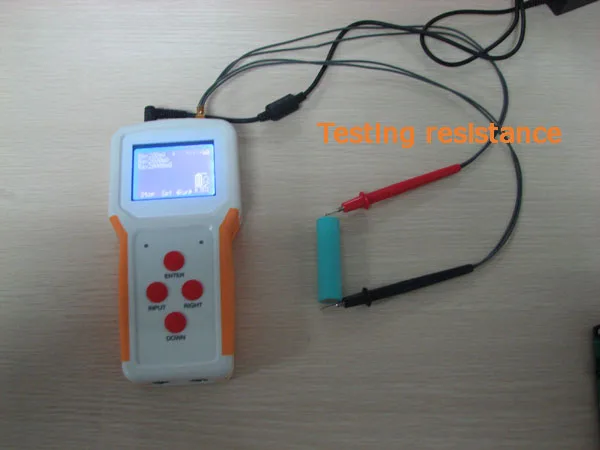
How to test the internal resistance of batteries
Put the Testing pin into the tester and choose the R.TEST menu, then use the pin to connect batteries .

How to test the Voltage:
Making the right connecting and choose the V.TEST menu and enter the RUN item by ENTER buttom

How to test the capacity
Making the right connection and choose the C.TEST menu and enter the RUN item by ENTER button,


We Recommend







New Arrivals
New products from manufacturers at wholesale prices






